Recap
This post is the second of 4 in a series describing how I made an arrivals board for my nearest bus stops.
In the first post, I covered project setup and the code that retrieves and parses the arrival predictions data from the TfL API.
The end goal of the project is to display an image on an e-ink display containing this information, so the next step is to create the image.
The code can be found on on GitHub - london-bus-forecast.
Preliminaries
Image specifications
The 7.5in E-Ink Display can display 800x480 and can display white, black and two shades of grey. We will only use the black and white options though.
I ended up mounting the display in a standard 7x5in picture frame, with an opening of 6x4in (152.4x101.6mm). The display has dimensions of 170.2x111.2mm, so some of it would be covered, meaning I had less pixel real estate than the full resolution. The code uses a few margin/padding parameters, found using a mix of calculation and trial and error, which I won't go into.
More libraries
For making our image, we will use the image crate for its image type and some processing. To add text we add the imageproc crate. Finally, the ab_glyph crate lets us load the font.
cargo add image
cargo add imageproc
cargo add ab_glyph
The Font
The font we use is Cabin by Impallari Type, Rodrigo Fuenzalida - Licensed under SIL Open Font License, version 1.1.
It's inspired by the Johnston typeface which is used across TfL, so it's a good fit for our project.
I include the medium weight file in the src folder with the source files.
Code
Main Image Function
The main function is given below:
use image::{GrayImage, ImageBuffer, Luma};
use anyhow::anyhow;

pub const WIDTH: u32 = 800;
pub const HEIGHT: u32 = 480;
pub const LEFT_OFFSET: i32 = 100;
pub const RIGHT_OFFSET: i32 = 480;
pub const MAX_ARRIVALS: usize = 6;


fn make_grayscale_image(
    stop_id: &str,
    stop_id2: &str,
    tfl_key: Option<&str>,
) -> anyhow::Result<ImageBuffer<Luma<u8>, Vec<u8>>> {
    let client = reqwest::Client::new();
    let rt = tokio::runtime::Runtime::new().unwrap();
    let (result1, result2) = rt.block_on(async {
        let arrivals = get_arrivals(&client, stop_id, tfl_key);
        let arrivals2 = get_arrivals(&client, stop_id2, tfl_key);
        join!(arrivals, arrivals2)
    });
    let arrivals = result1?;
    let arrivals2 = result2?;
    let arrivals_left = limit_arrivals(&arrivals, MAX_ARRIVALS);
    let arrivals_right = limit_arrivals(&arrivals2, MAX_ARRIVALS);

    let white = Luma([255u8]);
    let mut image = GrayImage::from_pixel(WIDTH, HEIGHT, white);

    draw_arrivals(&mut image, &arrivals_left, LEFT_OFFSET)?;
    draw_arrivals(&mut image, &arrivals_right, RIGHT_OFFSET)?;
    Ok(image)
}
- The
get_arrivalsfunction was defined in the first post. It gets the list of arrivals for the given bus stop as a vector ofArrivalstructs. limit_arrivalsis used to limit the number of arrivals shown to a maximum of 7, trying to keep the most relevant data.draw_arrivalsdraws the arrivals onto the image. The arrivals for one stop are on the left and the other is on the right.
get_arrivals is already covered, so lets look at the other functions.
Limiting the Arrivals
To make the most of the limited space we have, I'd like to limit the number of arrivals I display, and sort them by soonest first. For brevity, I won't include the filtering/sorting code, but this is how it works.
- Loop through the arrivals and add the soonest arrival from each unique bus line
- Add arrivals not already added, soonest first until the list is at maximum size or there are no more arrivls.
- Sort the list by soonest first.
I use a maximum size of six. The idea is to ensure users can always see the next arrival of their chosen bus, even if it means some arrivals are skipped.
Drawing the Arrivals
Here is the function that draws the arrivals onto the image.
use ab_glyph::{FontRef, PxScale};
use imageproc::drawing::draw_text_mut;

pub const TEXT_HEIGHT: i32 = 40;
pub const TOP_OFFSET: i32 = 25;
pub const ASOF_MARGIN: i32 = 25;

static FONT: std::sync::LazyLock<FontRef> = std::sync::LazyLock::new(|| {
    let font_bytes = include_bytes!("Cabin-Medium.ttf");
    FontRef::try_from_slice(font_bytes).expect("Failed to load font")
});

fn draw_arrivals<A: Borrow<Arrival>>(
    image: &mut ImageBuffer<Luma<u8>, Vec<u8>>,
    arrivals: &[A],
    x_offset: i32,
) -> anyhow::Result<()> {
    let scale = PxScale {
        x: TEXT_HEIGHT as f32,
        y: TEXT_HEIGHT as f32,
    };
    let black = Luma([0u8]);

    let last = arrivals
        .iter()
        .filter_map(|a| {
            let a: &Arrival = a.borrow();
            a.borrow()
                .timestamp
                .map(|ts| ts.to_zoned(LONDON_TZ.clone()))
        })
        .max()
        .ok_or_else(|| anyhow!("No time."))?;
    let n = arrivals.len();
    let dest_line = {
        let dest: &str = arrivals
            .iter()
            .find_map(|a| a.borrow().towards.as_ref())
            .ok_or_else(|| anyhow!("No destination name."))?;
        if dest.is_empty() {
            bail!("No destination name.");
        }
        let dest = words_to_n(dest.split_whitespace(), 15);

        format!("» {dest}")
    };
    let station_name = arrivals
        .iter()
        .find_map(|a| a.borrow().station_name.clone())
        .ok_or_else(|| anyhow!("No station name."))?;

    draw_text_mut(
        image,
        black,
        x_offset,
        TOP_OFFSET,
        scale,
        &*FONT,
        &station_name,
    );
    draw_text_mut(
        image,
        black,
        x_offset,
        TOP_OFFSET + TEXT_HEIGHT,
        scale,
        &*FONT,
        &dest_line,
    );
    for (i, arrival) in arrivals.iter().enumerate() {
        let arrival: &Arrival = arrival.borrow();
        if arrival.operation_type.unwrap_or_default() == OperationType::Stale {
            continue;
        }
        let (Some(tts), Some(line_name)) = (arrival.time_to_station, arrival.line_name.as_ref())
        else {
            continue;
        };

        let (min, sec) = (tts / 60, tts % 60);
        let text = format!("{line_name}: {min}m{sec}s");
        draw_text_mut(
            image,
            black,
            x_offset,
            (i + 2) as i32 * TEXT_HEIGHT + TOP_OFFSET,
            scale,
            &*FONT,
            &text,
        );
    }
    draw_text_mut(
        image,
        black,
        x_offset,
        (n as i32 + 2) * TEXT_HEIGHT + TOP_OFFSET + ASOF_MARGIN,
        scale,
        &*FONT,
        &format!("As of {}", last.strftime("%H:%M:%S")),
    );
    Ok(())
}
Lets look at the arguments:
image: &mut ImageBuffer<Luma<u8>, Vec<u8>>: this is the image canvas. We take a mutable reference because we are adding the arrivals onto our canvas.ImageBufferis the image type provided by the image crate.Luma<u8>is the type of the pixels in the image. Luma just means a single brightness channel: i.e. grayscale.Vec<u8>is the type of the underlying container which holds the pixel data
arrivals: &[A]: this is the list of arrivals. As in the first post,Acan beArrivalor&Arrival.x_offset: i32: the horizontal offset of where to start drawing the arrivals. We use 100 for the left column and 480 for the right column.
Now to explain what we are doing with the font. Since Rust 1.80, LazyLock has been available, which is similar to the lazy_static crate.
We only want to load the font once, but we want it thereafter to be available everywhere. With a LazyLock, the first time we try to access the value, it runs the initialisation code in the new closure. After that, it can use the stored value. The initialisation code uses the include_bytes! macro to access the raw bytes of the font file. This means the font data will be packaged in the executable, so we don't need to distribute it separately.
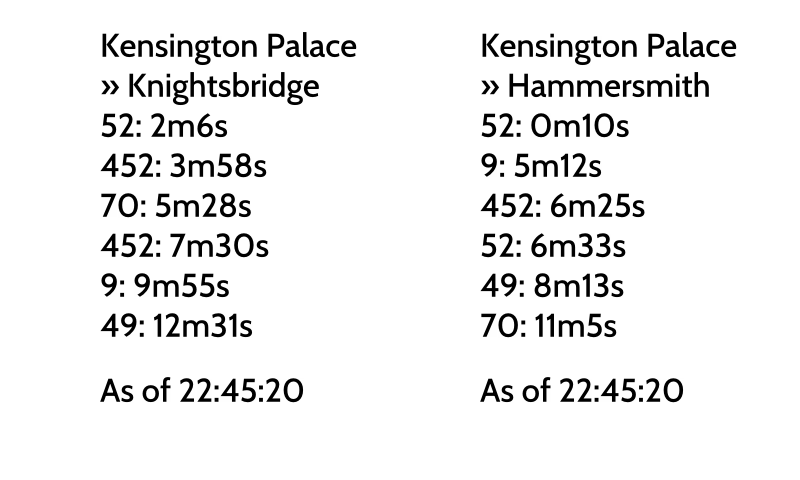
The function itself is fairly straightforward. The first part scans the list of arrivals to find the name of the station and its direction, which we draw first. Each arrival prediction has a timestamp associated so next, we get the latest timestamp so we can tell the user the arrival times are "as of X".
Next it loops through the list of arrivals, using the let...else construction to skip any Arrival object where the key fields are missing, drawing the line name and time to arrival for each one.
Finally, we print the aforementioned "As of" timestamp.
All this relies on the draw_text_mut function from the imageproc crate.
Creating a viewable image
So far, we have a function to create an image of type ImageBuffer. Eventually, we want to display it on the e-ink display. For now, we will just save it as a PNG file.
To elegantly cover both cases, we will create a custom trait for writing images. A trait defines shared behaviour for a group of types. Our types could be representations of a PNG file or our E-ink display. The shared behaviour is "writing" an image to the thing.
Our trait is given below:
trait ImageWrite {
    fn put_image(&mut self, image: &ImageBuffer<Luma<u8>, Vec<u8>>) -> anyhow::Result<()>;
}
Now lets create a struct representing a PNG file.
struct ImageFile {
    path: PathBuf,
}
impl ImageFile {
    fn new<P: AsRef<Path>>(path: P) -> Self {
        let path = path.as_ref().to_owned();
        Self { path }
    }
}
Now lets implement the trait. All we need to so is save the image to the path specified in the struct.
impl ImageWrite for ImageFile {
    fn put_image(&mut self, image: &ImageBuffer<Luma<u8>, Vec<u8>>) -> anyhow::Result<()> {
        Ok(image.save(&self.path)?)
    }
}
Note that the self argument is a mutable reference to the struct, even though it doesn't need to be mutable for the ImageFile implementation. The e-ink display implementation will require mutability so this is a bit of "future-proofing".
With this, our main function becomes:
fn main() -> anyhow::Result<()> {
    dotenvy::dotenv()?;
    let stop_id = std::env::var("STOP1")?;
    let stop_id2 = std::env::var("STOP2")?;
    let tfl_key = std::env::var("TFL_KEY").ok();

    let image = make_grayscale_image(&stop_id, &stop_id2, tfl_key.as_deref())?;

    let mut writer = ImageFile::new("out.png");

    writer.put_image(&image)?;

    Ok(())
}
This is what the result looks like for our example bus stops.